Watchdog
Watchdog is Cupcake's LLM-as-a-judge capability. It evaluates AI agent tool calls using another LLM before they execute, providing semantic security analysis that complements deterministic policy rules.
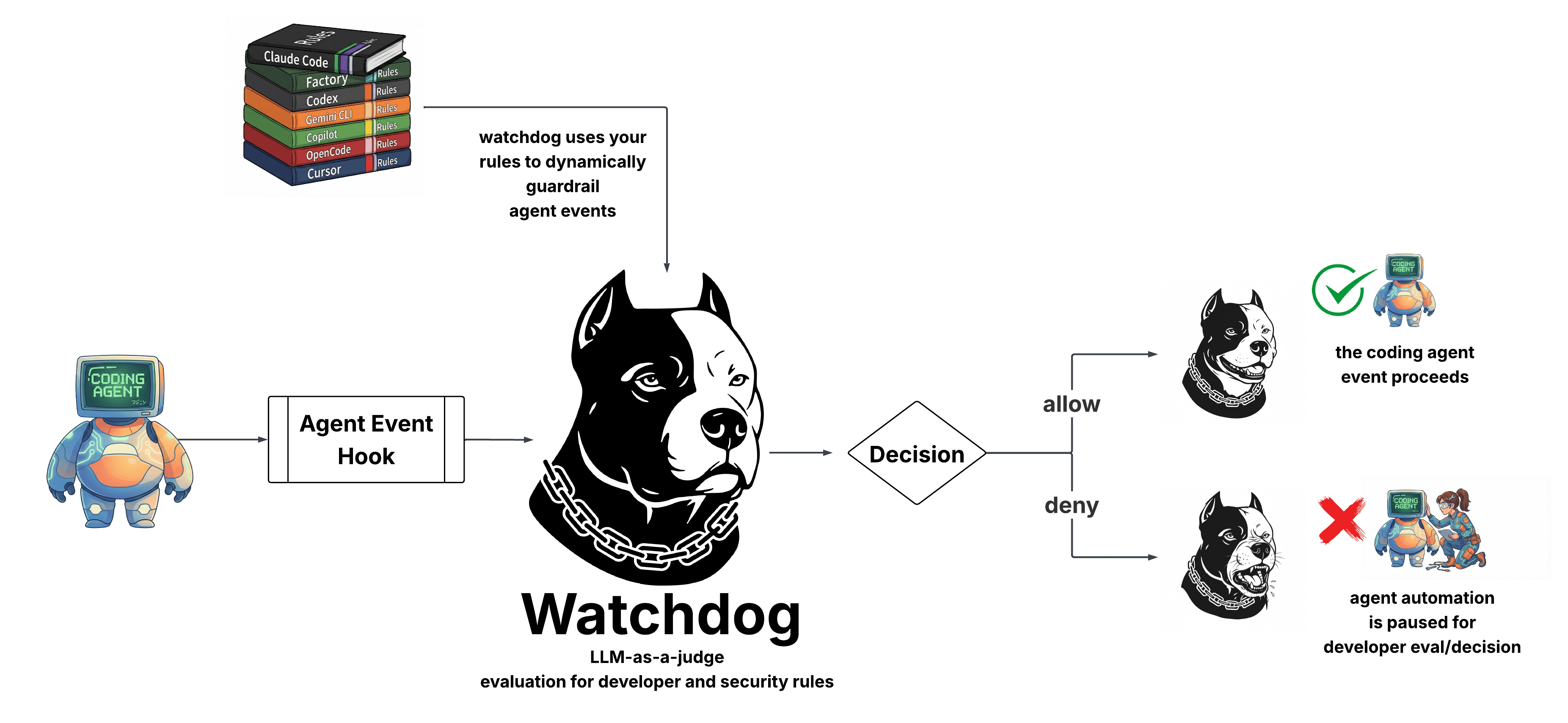
What is LLM-as-a-Judge?
LLM-as-a-judge is a pattern where one AI model evaluates the outputs or actions of another. Instead of relying solely on pattern matching or static rules, you use an LLM's reasoning capabilities to assess whether an action is appropriate, safe, or aligned with intent.
For AI coding agents, this means:
- Semantic understanding: Catching threats that don't match simple patterns
- Context awareness: Evaluating actions against the broader conversation
- Dynamic reasoning: Adapting to novel situations without new rules
Why Cupcake is Well-Positioned for This
Cupcake already sits at the chokepoint between AI agents and their tools. Every file edit, shell command, and API call flows through Cupcake's policy engine. This makes it the natural place to add LLM-based evaluation:
- Already intercepting events: No additional integration work for users
- Structured input: Events are already parsed and normalized
- Policy composition: Watchdog results flow into the same policy system as deterministic rules
- Fail-safe by default: If the LLM is unavailable, Cupcake's deterministic policies still protect you
How It Works
When Watchdog is enabled:
- An AI agent attempts a tool call (e.g., run a shell command)
- Cupcake intercepts the event as usual
- Watchdog sends the event to an LLM for evaluation
- The LLM returns a structured judgment: allow/deny, confidence, reasoning
- This judgment is available to your policies as
input.signals.watchdog - Your policies decide the final outcome
Agent Action → Cupcake → Watchdog (LLM) → Policy Evaluation → Decision
Use Cases
Security
- Detecting data exfiltration attempts that don't match known patterns
- Identifying commands that seem misaligned with the user's stated intent
- Flagging suspicious sequences of actions
Developer Experience
- Suggesting better approaches before executing suboptimal commands
- Providing context-aware warnings
- Guiding agents toward project-specific best practices
Non-Deterministic Answer to Non-Determinism
AI agents are inherently non-deterministic. They can be prompted, confused, or manipulated in ways that deterministic rules can't anticipate. Watchdog addresses this by fighting fire with fire—using AI to evaluate AI.
This doesn't replace deterministic policies. It complements them. Use Rego rules for known patterns and hard requirements. Use Watchdog for semantic analysis and catching the unexpected.
Configuration
Watchdog uses a self-contained directory structure for configuration, keeping your rulebook.yml clean.
Directory Structure
.cupcake/
├── rulebook.yml              # Just: watchdog: true
└── watchdog/
    ├── config.json           # Backend, model, timeout settings
    ├── system.txt            # Custom system prompt (optional)
    └── user.txt              # User message template (optional)
Quick Start
- Enable Watchdog in
rulebook.yml:
watchdog: true
- Set your API key:
export OPENROUTER_API_KEY="sk-or-..."
That's it. Watchdog uses sensible defaults for everything else.
Configuration Files
rulebook.yml
The rulebook only controls whether Watchdog is enabled or disabled. All other settings come from .cupcake/watchdog/config.json.
# Enable Watchdog (uses defaults or config.json settings)
watchdog: true

# Or explicitly disable
watchdog: false
Note: The
rulebook.ymlfile only reads theenabledstate. Any other settings (model, timeout, etc.) placed inrulebook.ymlwill be ignored. Use.cupcake/watchdog/config.jsonfor all configuration.
config.json
Create .cupcake/watchdog/config.json to customize settings:
{
  "backend": "openrouter",
  "model": "google/gemini-2.5-flash",
  "timeout_seconds": 10,
  "on_error": "allow",
  "api_key_env": "OPENROUTER_API_KEY",
  "rulesContext": {
    "rootPath": "../..",
    "files": ["CLAUDE.md", ".cursorrules"]
  }
}
All fields are optional - unspecified fields use defaults.
| Field | Type | Default | Description |
|---|---|---|---|
backend |
string | "openrouter" |
LLM backend to use |
model |
string | "google/gemini-2.5-flash" |
Model ID |
timeout_seconds |
integer | 10 |
API call timeout |
on_error |
string | "allow" |
"allow" (fail-open) or "deny" (fail-closed) |
api_key_env |
string | "OPENROUTER_API_KEY" |
Environment variable for API key |
rulesContext |
object | null |
Configuration for injecting rules files into prompts |
rulesContext
The rulesContext option allows you to inject the contents of rule files (like CLAUDE.md or .cursorrules) into the Watchdog prompt, so the LLM can evaluate actions against your project-specific rules.
| Field | Type | Default | Description |
|---|---|---|---|
rootPath |
string | "../.." |
Path relative to config.json location to find files |
files |
array | [] |
List of files to load, relative to rootPath |
strict |
boolean | true |
If true, fail initialization when any file is missing. If false, log a warning and continue. |
Since config.json is in .cupcake/watchdog/, the default rootPath of "../.." points to the project root.
Strict mode (default): Watchdog will fail to initialize if any configured file cannot be loaded. This ensures you're always protected by your documented rules.
Non-strict mode: Set "strict": false to allow graceful degradation when files are missing. Useful when files may be optional or environment-dependent.
system.txt
Custom system prompt for the LLM evaluator. If not provided, a built-in security-focused prompt is used.
You are a security reviewer for an AI coding agent...
user.txt
Template for the user message sent to the LLM. Available placeholders:
| Placeholder | Description |
|---|---|
{{event}} |
Pretty-printed JSON of the event being evaluated |
{{rules_context}} |
Contents of files specified in rulesContext config |
Example custom template:
Evaluate this tool call:
{{event}}

{{rules_context}}

Focus on security implications.
Default template:
{{event}}

{{rules_context}}
When rulesContext is configured, the {{rules_context}} placeholder is replaced with:
Determine if the agent action breaks any of the rules provided below:

=== CLAUDE.md ===
[contents of CLAUDE.md]

=== .cursorrules ===
[contents of .cursorrules]
If no rulesContext is configured, {{rules_context}} is replaced with an empty string.
Configuration Precedence
Watchdog loads configuration with this precedence:
- Project:
.cupcake/watchdog/(highest priority) - Global: Platform-specific config directory
- Defaults: Built-in values
Global Configuration Paths
The global configuration path varies by platform:
- Linux:
~/.config/cupcake/watchdog/ - macOS:
~/Library/Application Support/cupcake/watchdog/ - Windows:
%APPDATA%\cupcake\watchdog\
This allows organization-wide defaults that projects can override.
CLI Options
The cupcake watchdog command supports additional flags:
# Test configuration without making API calls
cupcake watchdog --dry-run < event.json

# Override the model for this run
cupcake watchdog --model "anthropic/claude-3-haiku" < event.json

# Read from file instead of stdin
cupcake watchdog --input event.json
Configuration Examples
Minimal Setup
# .cupcake/rulebook.yml
watchdog: true
export OPENROUTER_API_KEY="sk-or-..."
Custom Model and Timeout
// .cupcake/watchdog/config.json
{
  "model": "anthropic/claude-3-haiku",
  "timeout_seconds": 15
}
Fail-Closed (Strict Mode)
// .cupcake/watchdog/config.json
{
  "on_error": "deny"
}
With on_error: deny, if the LLM is unavailable, Watchdog blocks the action rather than allowing it.
Custom Prompts
// .cupcake/watchdog/system.txt
You are reviewing tool calls for a financial application.
Be extra cautious about:
- Database modifications
- File access outside /app
- Network requests to external services
Using Rules Context
Inject your project's rules (like CLAUDE.md) into the Watchdog prompt:
// .cupcake/watchdog/config.json
{
  "rulesContext": {
    "rootPath": "../..",
    "files": ["CLAUDE.md"]
  }
}
This loads the contents of CLAUDE.md from your project root and injects it into the prompt, allowing the LLM evaluator to check if agent actions comply with your documented rules.
By default, strict is true, so Watchdog will fail to initialize if any file is missing. For optional rules files:
// .cupcake/watchdog/config.json
{
  "rulesContext": {
    "rootPath": "../..",
    "files": ["CLAUDE.md", ".cursorrules"],
    "strict": false
  }
}
Organization-Wide Defaults
Create a global config at your platform's config directory (see Global Configuration Paths):
// Linux: ~/.config/cupcake/watchdog/config.json
// macOS: ~/Library/Application Support/cupcake/watchdog/config.json
{
  "model": "google/gemini-2.5-flash",
  "on_error": "deny"
}
Projects inherit these settings unless they provide their own .cupcake/watchdog/config.json.
Verifying Configuration
Use --dry-run to verify your configuration without making API calls:
echo '{"hook_event_name":"PreToolUse","tool_name":"Bash"}' | cupcake watchdog --dry-run
This logs the resolved configuration and what would be sent to the LLM.
Disabling Watchdog
# .cupcake/rulebook.yml
watchdog: false
Or simply remove the watchdog key entirely.
Backends
Watchdog uses a backend abstraction to communicate with LLMs. Currently, OpenRouter is the supported backend.
OpenRouter
OpenRouter provides a unified API for hundreds of AI models. It handles routing, fallbacks, and billing across multiple providers.
Setup
- Create an account at openrouter.ai
- Generate an API key
- Set the environment variable:
export OPENROUTER_API_KEY="sk-or-..."
- Enable Watchdog in
rulebook.yml:
watchdog: true
That's all you need. Watchdog uses google/gemini-2.5-flash by default.
Model Selection
To use a different model, create .cupcake/watchdog/config.json:
{
  "model": "anthropic/claude-3-haiku"
}
OpenRouter supports hundreds of models. See OpenRouter's model list for available options.
Popular choices for Watchdog:
- google/gemini-2.5-flash (default) - Fast, cost-effective
- anthropic/claude-3-haiku - Balanced speed and quality
- openai/gpt-4o-mini - Good reasoning capabilities
Custom System Prompt
By default, Watchdog uses a security-focused system prompt. Override it by creating .cupcake/watchdog/system.txt:
You are a code review assistant. Evaluate tool calls for:
- Security concerns
- Best practice violations
- Project-specific rules

Respond with JSON: {"allow": bool, "confidence": 0-1, "reasoning": "...", "concerns": [], "suggestions": []}
Custom User Template
The user message sent to the LLM can be customized via .cupcake/watchdog/user.txt:
Evaluate this tool call for our Python Django project:
{{event}}

Pay special attention to database operations and file access.
The {{event}} placeholder is replaced with the event JSON.
Future Backends
The backend abstraction is designed for extensibility. Planned backends include:
- Claude Code SDK: Local evaluation using the Claude instance already running on your machine
- Ollama: Self-hosted local models for air-gapped environments
These are not yet implemented. If you need a specific backend, please open an issue on GitHub.
Writing Policies with Watchdog
When Watchdog is enabled, its judgment is available to your Rego policies at input.signals.watchdog.
Watchdog Output Schema
{
  "allow": true,
  "confidence": 0.95,
  "reasoning": "This git push command appears safe and aligned with typical development workflow.",
  "concerns": [],
  "suggestions": []
}
Or when flagging a concern:
{
  "allow": false,
  "confidence": 0.82,
  "reasoning": "This command reads SSH private keys which could indicate data exfiltration.",
  "concerns": ["sensitive_file_access", "potential_exfiltration"],
  "suggestions": ["Consider using a deploy key instead", "Verify this action is intended"]
}
Fields
| Field | Type | Description |
|---|---|---|
allow |
boolean | Whether Watchdog recommends allowing the action |
confidence |
float (0-1) | How confident Watchdog is in this judgment |
reasoning |
string | Human-readable explanation |
concerns |
array | Specific concerns identified (empty if none) |
suggestions |
array | Alternative approaches or next steps |
Example Policies
Block High-Confidence Denials
package cupcake.policies.watchdog_security

import rego.v1

deny contains decision if {
    input.hook_event_name == "PreToolUse"

    watchdog := input.signals.watchdog
    watchdog.allow == false
    watchdog.confidence > 0.7

    decision := {
        "rule_id": "WATCHDOG-DENY",
        "reason": watchdog.reasoning,
        "severity": "HIGH",
    }
}
Ask for Confirmation on Medium Confidence
ask contains decision if {
    input.hook_event_name == "PreToolUse"

    watchdog := input.signals.watchdog
    watchdog.allow == false
    watchdog.confidence > 0.4
    watchdog.confidence <= 0.7

    decision := {
        "rule_id": "WATCHDOG-ASK",
        "reason": concat("", ["Watchdog flagged: ", watchdog.reasoning]),
        "question": "Do you want to proceed?",
        "severity": "MEDIUM",
    }
}
Add Context from Suggestions
add_context contains msg if {
    input.hook_event_name == "PreToolUse"

    watchdog := input.signals.watchdog
    watchdog.allow == true
    count(watchdog.suggestions) > 0

    msg := concat("\n", watchdog.suggestions)
}
Combining with Deterministic Rules
Watchdog works alongside your existing policies. A common pattern:
- Deterministic rules handle known patterns: Block
rm -rf /, protect.envfiles, etc. - Watchdog catches the unexpected: Novel attacks, misaligned intent, subtle issues
# Deterministic rule - always block this pattern
halt contains decision if {
    input.tool_name == "Bash"
    contains(input.tool_input.command, "rm -rf /")

    decision := {
        "rule_id": "BLOCK-DANGEROUS-RM",
        "reason": "Refusing to delete root filesystem",
        "severity": "CRITICAL",
    }
}

# Watchdog rule - catch things we didn't anticipate
deny contains decision if {
    input.signals.watchdog.allow == false
    input.signals.watchdog.confidence > 0.8

    decision := {
        "rule_id": "WATCHDOG-DENY",
        "reason": input.signals.watchdog.reasoning,
        "severity": "HIGH",
    }
}
Handling Missing Watchdog Data
If Watchdog is disabled or fails, input.signals.watchdog may not exist. Guard against this:
deny contains decision if {
    # Only evaluate if watchdog data exists
    watchdog := input.signals.watchdog
    watchdog != null

    watchdog.allow == false
    watchdog.confidence > 0.7

    decision := { ... }
}
Policy Routing
Watchdog runs automatically when enabled—you don't need to declare it in your policy's required_signals. The engine injects Watchdog results into every event evaluation.
Your policy's routing metadata should focus on events and tools:
# METADATA
# custom:
#   routing:
#     required_events: ["PreToolUse"]
#     required_tools: ["Bash", "Edit"]
package cupcake.policies.my_watchdog_policy